Jul 272012
 

Like. Read Later. +1. Tweet. Tumblr. StumbleUpon. For the last few years, little chiclet buttons have been spreading like measles across the web, appearing and vanishing as new tools and services rise and fall in popularity. The popular ShareThis button, which offers site owners the chance to at least corral all these social services into one pop-up box, currently offers over 120 potential destinations – and while nobody ever actually lists them all outright, it’s often hard to tell exactly who all the options are helping.

It’s a problem in need of fixing, and one that both Google and Mozilla have solutions in the works to handle – Web Intents and Web Actions/Activities respectively. Their executions vary, but the basic goal is the same: to move away from the site/app creator having to link to specific services to get things done, in favour of simply enabling them to provide verbs that the browser can handle on a user-by-user basis.

What would this mean in practice? Well, for example: at the moment, there are many different bookmarking tools, with two of the most popular being Delicious and Pinboard. To integrate a bookmark button on the end of an article, the site owner has to add two different chunks of code. In a Web Intents/Actions world this would simply become one ‘Bookmark This’ button. When the user clicks it, their browser sees the verb, consults its list of registered services, and hands over the data.

That’s only the simplest possible scenario, though. What stops Web Intents/Actions being a glorified ‘mailto: link’ is that they’re capable of far more, including two-way interaction that make them suitable for full web applications as well as simply chiclet replacements. Current Web Intents specifications handle the verbs Discover, Share, Edit, View, Pick, Subscribe and Save. With very little coding, for example, you can both send an image to an editor and receive the touched-up version back, just as easily as pulling information like contact details out of an external address book and into a specific form – all without a single custom API call or even knowing what the second party actually is.

MORE:  Web Intents: the future of web apps | Feature | .net magazine.


Jul 252012
 

Google has added a calculator to its search results.

After typing in a formula into its search, Google will spit out the answer in a new calculator it has brought to its results. Once the calculator is displayed, users can tap numbers and scientific functions to send it a new equation. The company’s search box will also still work.

Prior to this addition, Google allowed users to type into its search any equation. The search engine would then spit out the answer. However, this is the first time that Google has displayed an actual calculator its users can interact with.

MORE:  Google adds calculator to search results | Internet & Media – CNET News.


Jul 252012
 

Drag and drop a folder of files and you’re out of luck. Currently browsers just ignore folders dropped into them. Chrome, however, recently added folder support to its bag of drag-and-drop tricks. You’ll need to be using Chrome 21 or better (currently in the dev channel).

If you’d like to see how the new folder parsing works, HTML5Rocks has a quick little tutorial on how you can add support for folders to your web app.

The JavaScript required to support folders consists of an extra loop to tunnel through folders and get to “Entry” objects. That’s a slightly different syntax than what you might have seen if you’ve read tutorials on the File API in the past — using “Entry” instead of “File”. There are two new properties as well — .isFile and .isDirectory.

MORE:  Chrome 21 Adds New Drag-and-Drop Tricks | Webmonkey | Wired.com.


Jul 242012
 

There are a few things going on here. Page owners who thought tab apps were eliminated completely with Timeline have realized this isn’t the case and begun adding apps to their pages again. Users are becoming accustomed to the new layout and learning where to find additional content through apps. Page owners are adapting and employing better strategies to support the tab apps they implement. And clever developers are taking steps to help page owners understand best practices for apps on Timeline. Pages and developers that haven’t changed their approach have seen their numbers bottom out, as in the first graph above.

The key difference since Timeline is that now page owners have to actively promote their tab applications, whereas previously the app was the first thing new visitors saw when they came to the page. Woobox’s DeCarlo says he immediately recognized this and when Timeline launched, Woobox added a feature to give page owners a short shareable URL with a customizable image, headline and summary that would appear when the link was posted to Facebook.

Thunderpenny, another page app developer that is seeing an increase in users, has a new Tips & Tricks section that explains what page owners should do now that the default landing tab option is gone. For example, the developer recommends changing the links on a company’s website to lead to a specific tab rather than the main page. It also recommends giving the app prime placement among other tabs and using the new “pin post” option to prominently feature a status update that links to the tab.

MORE:  A few page tab apps begin to recover losses following removal of default landing tab: here’s why.


Jul 232012
 

It’s nice to have something happen when visitors arrive at your webpage. Videos and music are nice, but you can’t control the volume the user’s speakers will be set to, and custom applications can end up being too loud and startle users while sending them frantically looking for volume controls, or quickly clicking away.

An embedded Youtube video provides a familiar experience to the user, and has several features that make it fit nicely almost anywhere.

Below is the script you will need to embed your video or playlist. This code starts the video with the volume muted, and hides the controls until the user mouses over the video frame. Note: this will not work properly if you test it from your desktop. Once uploaded toy our site, it should work fine.


This embeds a playlist:

<script src=”http://www.google.com/jsapi”></script>
<script src=”http://ajax.googleapis.com/ajax/libs/swfobject/2.1/swfobject.js”></script>
<div id=”ytapiplayer”>You need Flash player 8+ and JavaScript enabled to view this video.</div>
<script type=”text/javascript”>
google.load(“swfobject”, “2.1”);
function onYouTubePlayerReady(playerId) {
ytplayer = document.getElementById(“myytplayer”);
ytplayer.playVideo();
ytplayer.mute();
}
var params = { allowScriptAccess: “always” };
var atts = { id: “myytplayer” };

swfobject.embedSWF(“http://www.youtube.com/v/mOLp4doE51Q&list=PL
86C090F73345FED6&feature=plpp_play_all?
enablejsapi=1&playerapiid=ytplayer&allowFullScreen=true&version=3&loop=1&autohide=1″,
 “ytapiplayer”, “100%”, “380”, “8”, null, null, params, atts)

</script>

To embed a single video, just change the bold part to the normal Youtube video URL:

swfobject.embedSWF(“http://www.youtube.com/v/mOLp4doE51Q?enablejsapi=1&playerapiid=ytplayer&allowFullScreen=true&version=3&loop=1&autohide=1″,
“ytapiplayer”, “100%”, “380”, “8”, null, null, params, atts)


Here are some links that may be helpful:

This post and a better representation of the code are available here.

YouTube Embedded Players and Player Parameters

YouTube JavaScript Player API Reference


Jul 152012
 

Mafia Wars, Farmville, Poker, we all get those endless notifications from friends asking us to join games they’re playing. Some people don’t care that they are spamming you, some just don’t know. Many apps are sneaky abut sending requests to all your friends. So what do you do?

Facebook has several help posts involving privacy and app settings. The easiest way we’ve found is shown below, with some helpful links after that.

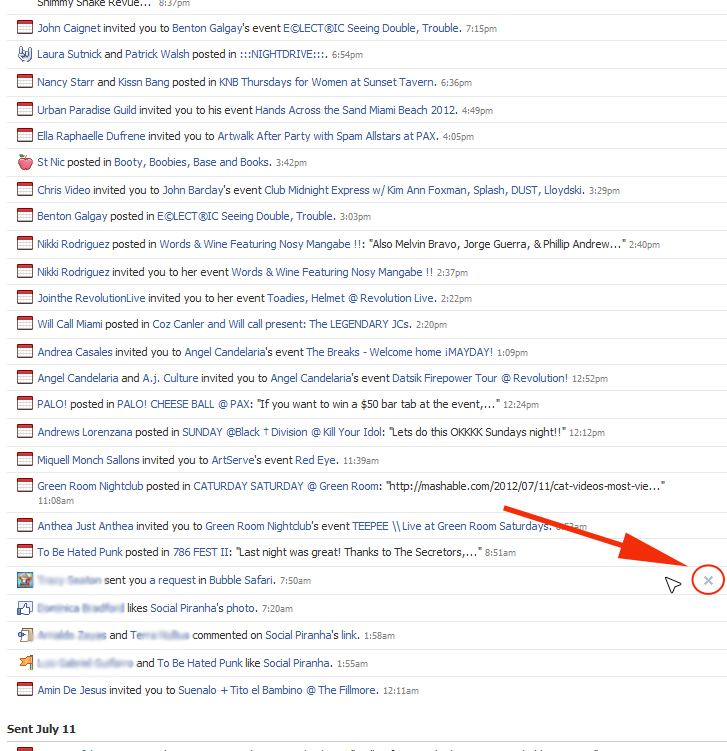
1. View your notifications. When you see an annoying invite you wish to block, click ‘see all notifications’ at the bottom of the list.

2. When you click ‘see all notifications’ you should get a page that looks something like this. Find the invite on the page. When you move the mouse pointer over the app notice, a small ‘x’ will appear to the right.

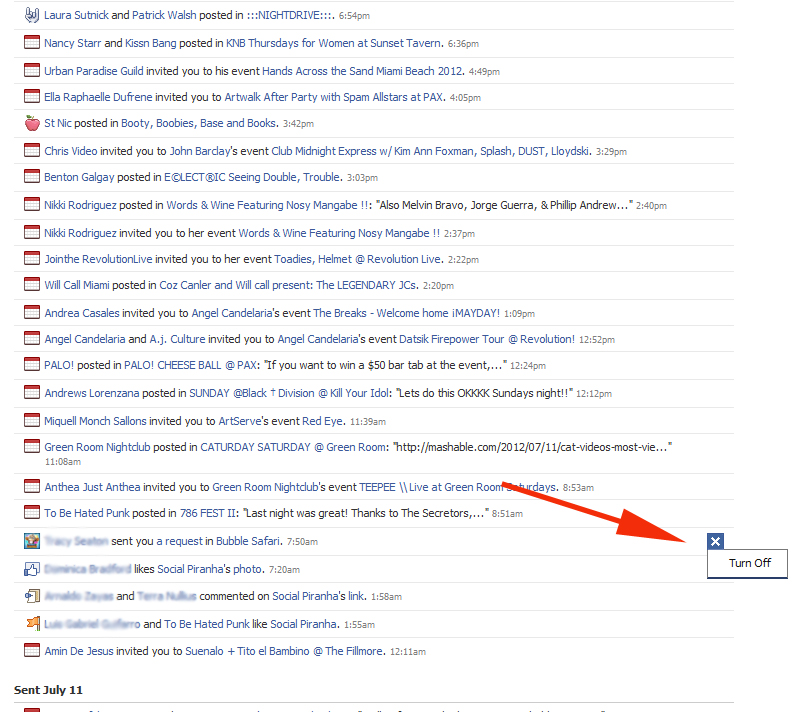
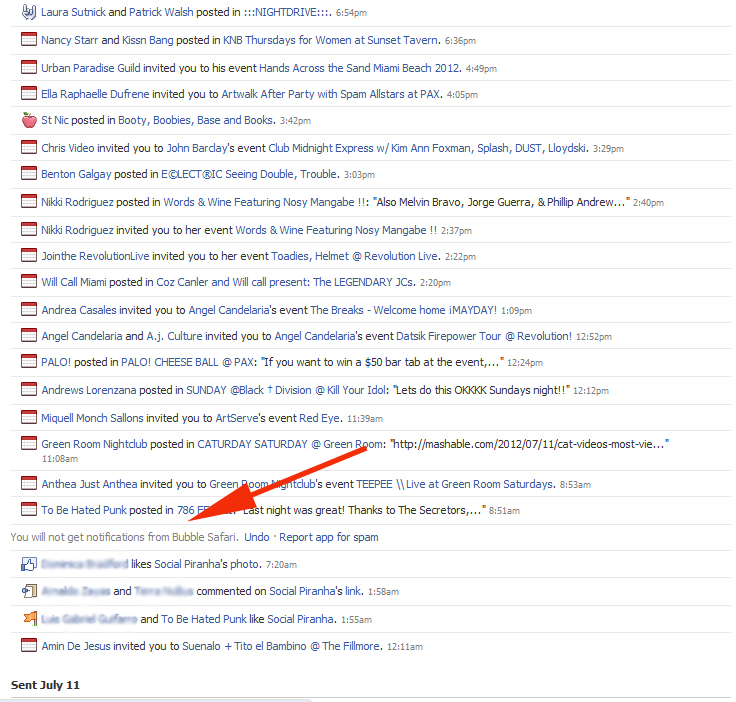
3. Click the ‘x’. When you do, it will say ‘turn off’. Click ‘turn off’, and a notice will appear telling you you’ve successfully blocked the game or app. That’s it!


There are other ways to do this through privacy settings and blocking all notices from a friend. Here are a couple of links that may also be helpful:

http://www.facebook.com/help/?faq=202866049749634

http://www.facebook.com/help/?faq=121070141307903


Jul 112012
 

Creative coder and developer Paul Lewis rounds up 10 of the best new WebGL sites and provides some handy tips along the way, if you, too, want to join the 3D revolution

WebGL, then. It’s been around a while, and it looks like it’s here to stay. As you’ve hopefully seen it’s incredibly powerful, capable of pushing around thousands of polygons and particles all the while giving us tons of visual goodies. It’s fair to say I’m a big fan and, if Twitter reactions are anything to go by, so are a lot of other people!

Right now virtually all the major browser manufacturers support WebGL in their browser, although sometimes it needs to be enabled manually. So that’s Chrome, Firefox, Safari and Opera that will all let you see the wonder of WebGL. Still no word on Internet Explorer yet, although hope springs eternal!

About a year ago we ran a feature on 20 WebGL sites that will blow your mind. In internet terms a year is a phenomenally long time, so what we thought we’d do is take a look at what’s new. So once again sit back, crank up your latest browser and feast your eyes on these beauties!

MORE:  Another 10 WebGL sites that will blow you away | Feature | .net magazine.


Jul 112012
 

Page owners and fans can now view the most popular videos and news articles about a topic by visiting the brand or public figure’s Facebook page.

In the “posts by others” view of Timeline, some pages have “news” and/or “video” modules that shows what users have been reading and watching in Open Graph-integrated apps like Socialcam, Washington Post Social Reader, ESPN, Hulu and others. It’s unclear when Facebook added these modules to pages’ Timelines, but with more media apps integrating Open Graph and more people using them, the data here is increasingly valuable.

MORE:  Facebook pages now show top related articles and videos based on users’ Open Graph activity.


Jul 102012
 

Mozilla’s Jono DiCarlo has come out to say what many a Firefox user has long been thinking: the rapid release cycle is killing Firefox.

DiCarlo has a long and well-argued post on how and why Firefox’s attempts to ape Google Chrome have not only made the browser less usable, but done the very thing Mozilla was trying to prevent — driving people to switch to Chrome.

The problem, argues DiCarlo, isn’t just the rapid releases, but the way Mozilla has handled them:

Ironically, by doing rapid releases poorly, we just made Firefox look like an inferior version of Chrome. And by pushing a never-ending stream of updates on people who didn’t want them, we drove a lot of those people to Chrome; exactly what we were trying to prevent.

That squares with the user feedback Webmonkey has received over the last year or so of rapid Firefox updates — comment after comment of fed-up users tired of the endless updates and dialog boxes. Less anecdotally, Webmonkey traffic from Firefox has declined from roughly 34 percent to roughly 30 percent since Firefox 4 and the rapid release cycle debuted.

MORE: Firefox Developer: ‘Everybody Hates Firefox Updates’ | Webmonkey | Wired.com.


Jul 092012
 

In a recent blog post, John Battelle writes, “Display advertising is dead. Or put more accurately, the world of ‘boxes and rectangles’ is dead. No one pays attention to banner ads, the reasoning goes, and the model never really worked in the first place (except for direct response). Brand marketers are demanding more for their money, and standard display is simply not delivering. After nearly 20 years, it’s time to bury the banner, and move on to…well something else.”

As a director of digital media at Rosetta, a focus of my role is on display and its role within our clients’ media mix, so reading John’s article raised some questions for me. If he’s right, and “display is dead,” what’s the next phase of digital marketing? I think the answer to that question depends largely on the advertiser’s business objective.

MORE:  Is display really dead? – iMediaConnection.com.